
Table of Contents
Pro Feature
This is a part of the Visual Portfolio Pro plugin.
Purchase the Pro plugin to access this and other advanced features.
Visual Portfolio → Settings → Social Feeds. One tab per network. Each tab lists the connected accounts and a + Connect button.
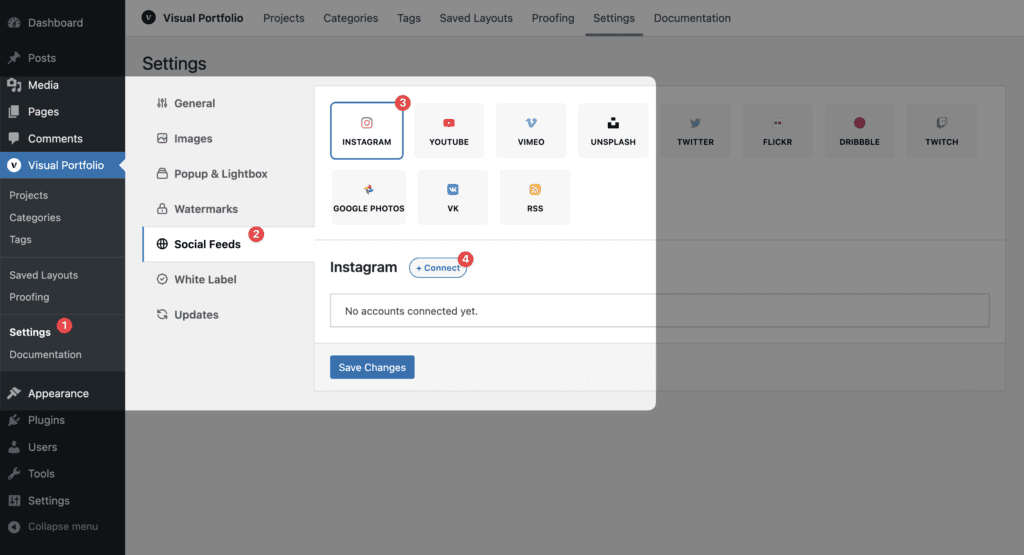
Controls
| Control | What it does |
|---|---|
| + Connect | Adds an account form. Networks with a login popup (Instagram, Unsplash, Dribbble, Twitch, VK) open it; the popup fills the token fields. The others show text fields for keys |
| Name | A label for the account, shown in the block’s account dropdown. Instagram and VK fill it from the login |
| Edit | Reopens the fields of a saved account |
| Remove | Deletes the account and its Social Items after a confirmation |
| Reconnect | Runs the login again for an account whose token expired or was issued by an older API (Instagram, Twitch) |
| Purge Cache | Deletes the account’s imported items and forces a full re-import on the next sync |
| Save Changes | Saves the tab and starts the import of new or changed accounts |
Fields per network are on the network pages. Credentials are stored in your database and are never sent to the block editor; the editor only receives account names.
The Instagram tab warns when your database does not use utf8mb4: captions with emoji cannot be stored then. Ask your host to convert the database (see Social feeds troubleshooting).