
Table of Contents
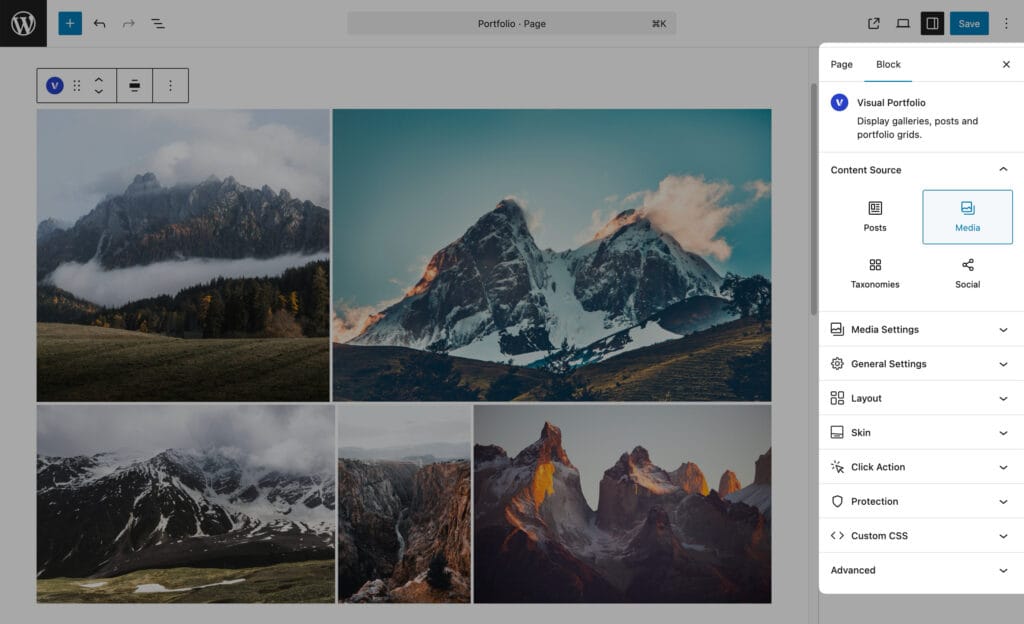
Block settings → Content Source. Four sources:
| Source | Items | Plan |
|---|---|---|
| Posts | Posts of any post type: projects, blog posts, pages, products | Free |
| Media | Images (and with Pro, local videos) picked from the Media Library and managed inside the block | Free |
| Taxonomies | Terms of a taxonomy, one item per category, tag or custom term | Pro |
| Social | Posts imported from a connected social account | Pro |
Choosing a source shows its settings panel and unlocks the other panels.
Social
Pro. The Social source shows posts imported from an account you connected in Visual Portfolio → Settings → Social Feeds. Connect the account first; the block then lists the profiles you can pick from. See Social Feeds.
General Settings
| Setting | Values | Default | Notes |
|---|---|---|---|
| Items Per Page | Custom Count (1 or more) or All Items | 6 | All Items stores -1 and asks for confirmation. Above 45 items (or with All Items) the editor warns that large galleries slow the page and suggests Load More or Infinite pagination; “Ok, I understand” hides the warning. Hidden for the Current Query source, where the archive setting applies |
| No Items Action | Notice, Hide | Notice | What to render when the query returns nothing |
| Notice text | Text | No items were found matching your selection. | Shown for Notice. An empty text renders nothing. Translatable with WPML |
| Stretch | on / off | off | Breaks out of the container to full width. Shown in the Saved Layouts editor only; in the block editor use the wide and full alignments |