
Table of Contents
Block settings → Custom CSS. Styles you write here apply to this block only.
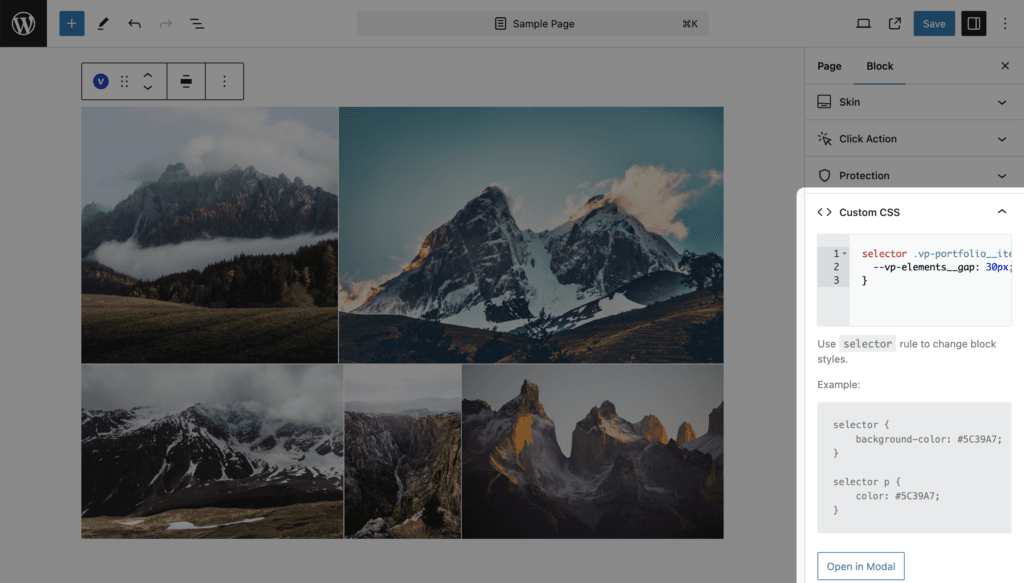
Write rules against the word selector. It is replaced on output by a class that is unique to this block, so the same rule can be pasted into another block without collisions.
selector .vp-portfolio__item {
    background-color: #f0f0f0;
}
Useful selectors
| Selector | What it matches |
|---|---|
selector | The block wrapper |
selector .vp-portfolio__items | The list of items |
selector .vp-portfolio__item | One item |
selector .vp-portfolio__item-img | The item image wrapper |
selector .vp-portfolio__item-overlay | The overlay of the Fade, Fly, Emerge and Caption Move skins |
selector .vp-portfolio__item-caption | The caption of the Classic and Emerge skins |
selector .vp-filter | The filter |
selector .vp-sort | The sort |
selector .vp-search | The search (Pro) |
selector .vp-pagination | The pagination |
Click Open in Modal for a larger editor. The modal shows a Classes Tree with every class the current block renders, so you can pick selectors without the browser inspector. For anything not listed, use the browser’s inspector on the published page.
Notes
- HTML is not allowed in the field and is removed on save.
- Skins expose CSS variables you can override here as well. See CSS Variables.
- The block has no “Additional CSS class(es)” field. Use the HTML anchor field in the Advanced panel if you need an ID.